Part 1: The first statement
This is the first part of a five-part tutorial.
The Story of an African Chef
Section titled “The Story of an African Chef”Meet Gawie de Groot. Gawie is a successful mopane worm chef, based in the northernmost section of the Kruger National Park.
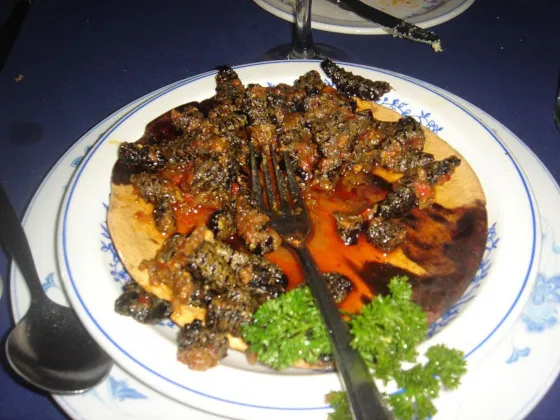
In times gone by he used to work in a big city as an IT professional. But after a few years he decided to choose a quieter life in the bushveld.
He now works at a renowned bush restaurant aptly named the “Grillerige Groen Goggatjie”.
Demand for his traditional African cuisine has sky-rocketed, with visitors from all over Zimbabwe, Mozambique and South Africa coming to enjoy his dishes.
Business has been good the last few years, but Gawie wants to make sure that he’ll also be OK when business is down.
It is time for Gawie to take charge of his finances.
Start a ledger
Section titled “Start a ledger”Gawie installed hledger-flow and runs it to see what it says:
hledger-flowhledger-flow turns bank statements into hledger journals and reports.
Commands: status Show what's in your ledger and what to do next init Start a new ledger in a folder import Turn statements into journals report Generate reports from your journals
Run `hledger-flow --help` for options and examples.
No hledger-flow ledger here or in any parent folder.Run `hledger-flow init` in an empty folder to start one.He makes a folder for his finances and starts a ledger in it:
mkdir my-financescd my-financeshledger-flow initStarted a ledger in ~/my-finances
Next: Put your first statement in import/<owner>/<bank>/<account>/1-in/<year>/ For example: import/me/mybank/checking/1-in/2026/statement.csv Then check with: hledger-flow status Docs: https://hledger-flow.github.io/go/input-files/Gawie can run hledger-flow status at any point to see the next step.
The first statement
Section titled “The first statement”Gawie starts with the easiest of his accounts: his Kudu Bank credit card. Kudu’s online banking exports a tidy CSV, with a header row, one row per transaction and dates hledger already understands:
Date,Description,Amount2016-03-02,PUNDA MARIA TRADING STORE,-842.502016-03-04,LETABA FUEL STOP,-910.00The Next: line said where statements go:
import/<owner>/<bank>/<account>/1-in/<year>/. Gawie is the owner, Kudu the
bank, and the account is his credit card:
mkdir -p import/gawie/kudu/creditcard/1-in/2016cp ../Downloads/Kudu/creditcard_2016-03-31.csv import/gawie/kudu/creditcard/1-in/2016/hledger-flow statusLedger: ~/my-finances (hledger 1.99.6-gc3a608c2b-20261101 found)
gawie/kudu/creditcard 1 statement (2016) ✗ no rules file
Next: Create import/gawie/kudu/creditcard/kudu-creditcard.rules (rules for gawie/kudu/creditcard) Run: hledger-flow status --rules-template gawie/kudu/creditcard Save its output as that file, then edit it. Docs: https://hledger-flow.github.io/go/rules-files/
Environment: hledger-flow 0.20.0 (b432c64), ghc 9.10, darwin aarch64 hledger ~/bin/hledger (1.99.6-gc3a608c2b-20261101) --hledger-path hledger.conf none --hledger-conf Cores 18, using 18status lists each account with its statements, says what to do next, and
ends with the versions and settings it found.
A rules file
Section titled “A rules file”hledger converts a CSV statement with a
rules file: a few lines saying which column is
which and which accounts to use. hledger-flow can draft one from the
statement’s header row:
hledger-flow status --rules-template gawie/kudu/creditcard# Starter rules for kudu/creditcard, made by hledger-flow from the header row of# import/gawie/kudu/creditcard/1-in/2016/creditcard_2016-03-31.csv. Check every line, then run: hledger-flow import# hledger's CSV rules reference: https://hledger.org/hledger.html#csv
skip 1fields date, description, amount
# Make the date format match your statement, e.g. %d/%m/%Y# date-format %Y-%m-%d
# Separate debit and credit columns? Name them amount-out and amount-in# in the fields line instead of amount.
account1 assets:kudu:creditcardaccount2 expenses:unknownThe draft is nearly right. skip 1 skips the header row, and the fields
line already names the date, description and amount columns. The dates are
in hledger’s own format, so there’s no date-format to set.
Gawie makes two changes. A credit card is money he owes, so account1 is a
liability. And the amounts are in rand, so he adds currency R. He saves
the result as import/gawie/kudu/creditcard/kudu-creditcard.rules:
skip 1fields date, description, amount
currency Raccount1 liabilities:kudu:creditcardaccount2 expenses:unknown
Import
Section titled “Import”hledger-flow importImported 1 statement for gawie/kudu/creditcard.That was it. Here’s what the import made:
tree.|-- all-years.journal`-- import |-- 2016-include.journal |-- all-years.journal `-- gawie |-- 2016-include.journal |-- all-years.journal `-- kudu |-- 2016-include.journal |-- all-years.journal `-- creditcard |-- 1-in | `-- 2016 | `-- creditcard_2016-03-31.csv |-- 2016-include.journal |-- 3-journal | `-- 2016 | `-- creditcard_2016-03-31.journal |-- all-years.journal `-- kudu-creditcard.rules
9 directories, 12 filesThe statement became an hledger journal in 3-journal/2016/:
head -n 7 import/gawie/kudu/creditcard/3-journal/2016/creditcard_2016-03-31.journal2016-03-02 PUNDA MARIA TRADING STORE liabilities:kudu:creditcard R-842.50 expenses:unknown R842.50
2016-03-04 LETABA FUEL STOP liabilities:kudu:creditcard R-910.00 expenses:unknown R910.00The *-include.journal and all-years.journal files tie every journal
together, so the top-level all-years.journal holds the whole ledger.
hledger-flow regenerates them on every import; don’t edit them.
Ask hledger
Section titled “Ask hledger”Gawie sets LEDGER_FILE so hledger reads the journal he just imported.
He also adds the export line to his shell profile for future sessions.
export LEDGER_FILE="$HOME/my-finances/all-years.journal"hledger balance R1745.60 expenses:unknown R-1745.60 liabilities:kudu:creditcard-------------------- 0Gawie owes Kudu Bank R1745.60, and every rand of it went to
expenses:unknown. That’s the job for part 2.